
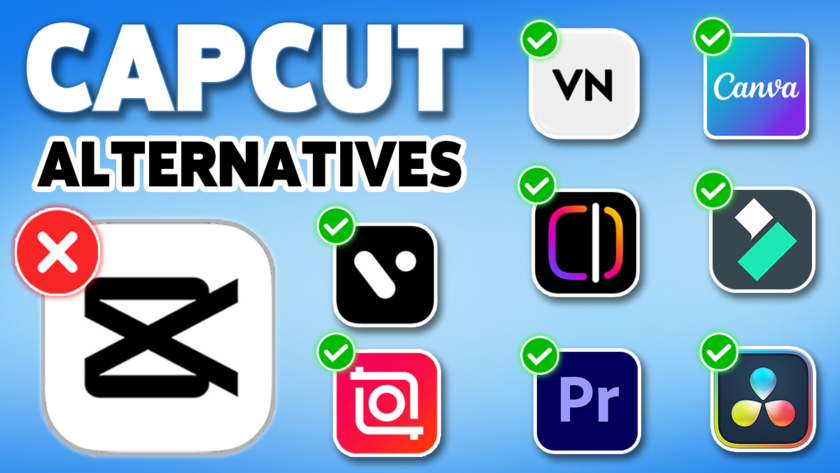
More creators are now exploring the best CapCut alternatives for mobile and PC, seeking video editing apps that offer greater creative freedom, smoother performance, and more advanced features without the limitations of CapCut.
The best CapCut alternatives for mobile and PC really depend on your editing goals, skill level, and the type of content you create. While CapCut is still widely used for quick edits, many creators now switch to the best CapCut alternatives for mobile and PC for more creative freedom, better performance, and advanced editing tools.
What increased CapCut’s popularity was its beginner-friendly nature. In contrast to conventional editing software that may seem intimidating at first, CapCut provides creators with a straightforward way to create polished, high-quality videos directly from their phones or PCs. Whether creating Instagram Reels, TikTok clips, YouTube Shorts, gaming highlights, or cinematic edits, CapCut emerged as the preferred choice for rapid content production.
Table of Contents
Why Look for CapCut Alternatives?
While CapCut remains a favored video editing app for short-form content, numerous creators are transitioning to other platforms due to its growing restrictions. There are several major reasons for looking for alternatives to CapCut:
🚀 Why People Are Switching from CapCut
- 💰 Paid subscription for advanced features that were once free
- 🔒 Privacy concerns due to ByteDance ownership (TikTok parent company)
- 🎬 Limited professional editing tools for advanced creators
- 🎨 Lacks advanced tools like colour grading, multicam editing, and pro audio control
The great news is that numerous fantastic video editing applications, similar to CapCut, are now accessible for both smartphones and computers. Some are ideal for novices, while others cater to experienced creators seeking professional-quality tools. Here are the top CapCut alternatives for mobile and PC in 2026:
Best CapCut Alternatives for Mobile
InShot: Best CapCut Alternative for Mobile


InShot is one of the greatest substitutes for CapCut if you’re looking for a straightforward yet effective mobile video editor. Because of its simple editing capabilities and clear UI, it has been a favorite among TikTok users, vloggers, and Instagram creators for years.
In contrast to many complex editing apps, InShot offers enough functionality for sophisticated short-form content creation while keeping everything user-friendly for beginners. You can easily resize clips for videos, apply filters, add music, and make transitions for several social media platforms.
✨ Best Features
🎯 Best For
VN Video Editor: Powerful CapCut Alternative for Android

VN Video Editor has gained immense popularity as it provides professional-grade editing features while keeping the app user-friendly. Numerous creators transition from CapCut to VN due to its greater manual control over editing, all while staying completely free for the majority of users.
A major strength of VN Video Editor is its multi-layer timeline editing system, making it one of the best CapCut alternatives for mobile and PC. It feels much closer to desktop editing software than most mobile apps. You can easily work with advanced transitions, keyframes, speed curves, and audio adjustments, which is why many creators choose it over other CapCut alternatives for mobile and PC.
✨ Best Features
🎯 Best For
Edits by Instagram: Social Media Focused CapCut Alternative


Meta’s Edits application is drawing interest as a rival to CapCut, particularly among creators on Instagram. Since it is tightly integrated with Instagram’s ecosystem, it emphasizes accelerating short-form content creation and enhancing social media engagement.
The application is tailored for creators who frequently share Reels and popular content. It provides intelligent editing features, effortless caption creation, and templates designed for social media that assist in expediting the editing workflow.
✨ Best Features
🎯 Best For
VITA: Easy Video Editing App Like CapCut

VITA is often overlooked as a mobile editing alternative to CapCut. It merges ease of use with fashionable built-in effects that enhance videos without needing extensive editing skills.
The application features movie-like filters, transitions, text templates, and music integration that are particularly suited for aesthetic edits, lifestyle videos, and montage projects. Numerous users appreciate VITA for its lightweight design while still providing impressively creative tools.
✨ Best Features
🎯 Best For
Best CapCut Alternatives for PC
Canva Video Editor: Beginner-Friendly CapCut Alternative for PC

Many individuals are familiar with Canva primarily for graphic design, but its video editing capabilities have developed significantly in recent years. It has become one of the easiest desktop editing platforms for creators seeking quick edits paired with templates and straightforward drag-and-drop functionality.
Canva is particularly effective for creating social media videos, presentations, marketing materials, and YouTube intros. While it might not fully take the place of professional editing software, it offers remarkable convenience for streamlined production processes.
✨ Best Features
🎯 Best For
DaVinci Resolve: Professional CapCut Alternative for Windows and Mac
DaVinci Resolve is undoubtedly one of the most robust video editing applications available today. Indeed, numerous professional filmmakers and YouTubers utilize it for sophisticated editing, color correction, and sound production.
DaVinci Resolve stands out as a powerful CapCut alternative because it provides professional-grade tools and includes a robust free version filled with features. The learning curve is more challenging than mobile editors, yet the creative opportunities are vast.
💻 Professional PC Editing Features
🎯 Best For
Wondershare Filmora: Simple Yet Powerful CapCut Alternative

Filmora strikes an ideal balance between ease of use for beginners and advanced editing capabilities for professionals. It’s an excellent option for users who find Premiere Pro or DaVinci Resolve too complex but desire more capabilities than standard mobile editors.
The application emphasizes quick performance and ease of access, offering modern editing tools such as motion tracking, AI effects, transitions, and pre-designed templates, making it one of the strong CapCut alternatives for mobile and PC. Many creators prefer it over other CapCut alternatives for mobile and PC because it balances simplicity with powerful editing features.
✨ Best Features
🎯 Best For
Adobe Premiere Pro: Advanced Video Editing Software


For years, Adobe Premiere Pro has been the standard software for video editing in the industry and is the best CapCut alternative for PCs. It is utilized by YouTubers, filmmakers, editors, and production companies globally due to its versatility and extensive range of tools.
When editing complex projects, Premiere Pro offers far more power than CapCut. It is primarily subscription-based, designed for professional production activities, and includes motion graphics integration with After Effects and multi-camera editing.
✨ Best Features
🎯 Best For
Final Thoughts
For mobile users, apps like InShot, VN, Meta Edits, and VITA stand out as some of the best CapCut alternatives for mobile and PC, especially for TikTok, Instagram Reels, and YouTube Shorts. They are simple, fast, and perfect for daily content creation.
For desktop users, tools like Canva, Filmora, DaVinci Resolve, and Adobe Premiere Pro are powerful best CapCut alternatives for mobile and PC, offering professional editing features, high-quality exports, and advanced workflow control.
Overall, these best CapCut alternatives for mobile and PC give creators more flexibility, smoother performance, and better editing possibilities than CapCut in many cases. The right choice from the best CapCut alternatives for mobile and PC list depends on whether you want simplicity, speed, or professional-grade editing.
If you want to explore beyond video editing tools, you can also check out our article on the best ChatGPT alternatives for everyday use.


- The Best 5 Alternatives of Spotify: Top Music Streaming Apps - May 15, 2026
- 8 Best CapCut Alternatives for Mobile and PC - May 12, 2026